
By Breault Research Organization
BIO Toolkit includes the Advanced Human Eye Model (AHEM) and the Realistic Skin Model (RSM). It models light propagation and scattering in biological systems.
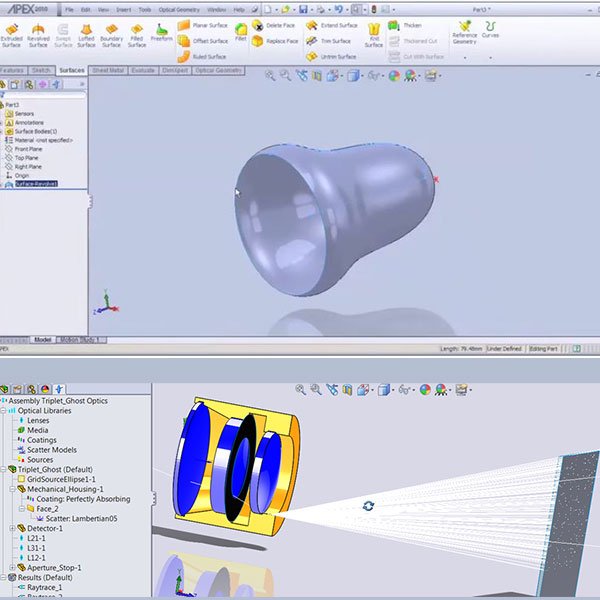
Optical Simulation Enabled in SolidWorks Designing, analyzing and optimizing optical and illumination systems is now at your fingertips! As an optical simulation and illumination add-in to the industry-standard SolidWorks 3D-modeling environment, APEX is tailor-made to meet the requirements of today's product design teams. Powered by BRO's kernel technology, APEX uses an easy-to-follow workflow; it facilitates and optimizes design team interactions with optical software tools in a true CAD interface. With the full power and sophistication of SolidWorks, in APEX there is no need to translate, bridge or link between two separate programs. In APEX, you learn, create, design, analyze, and optimize in the same program environment — and that environment is all about ease of use. APEX seamlessly melds the worlds of computer-aided design and optical engineering, resulting in an "optics aware" design application. No cad restrictions: In APEX, no CAD restrictions are placed on your optical components. Rather, APEX combines the power of SolidWorks geometry modeling with the rigor and precision needed for virtual prototyping of optical systems. Optical components created in APEX have optical tolerances and blend seamlessly into larger system models, including electrical, mechanical, and other system components. APEX is an optical engineering application tailor-made to meet the requirements of today's product design teams — whether big or small. Optical and mechanical engineers can finally work side-by-side on the same files. APEX files are SolidWorks files. Experimenting, evaluating, and innovating is easier than ever with APEX. optimizing systems: There are two ways to handle system creation for optical analysis in APEX. ONE: Utilize the fetures of SolidWorks and the APEX add-in to both build the mechanical structures of a system and optimize optical performance. This is the most common, and preferred, workflow of SolidWorks users. TWO: Utilize the robust CAD interoperability features of SolidWorks to import mechanical designs created in virtually any CAD program, and then optimize optical system performance. This is the preferred workflow for users of other CAD packages. Following completion of optical analysis in APEX, the optimized optical system can be reimported into the CAD package of choice to continue the engineering workflow. APEX FEATURES - POWERFUL OPTICAL DESIGN and analysis add-in for SolidWorks. There is no need to bridge or translate — for a truly seamless workflow. - SIMPLE WORKFLOW: APEX is easy to use and offers an easy-to-follow engineering workflow. - COMPREHENSIVE LIBRARIES: APEX includes a vast library of sources, lenses, media, coatings, and scatter models that you can incorporate into your design. - NON-SEQUENTIAL RAY TRACING: Fast and accurate optical simulation via non-sequential ray tracing. - FLEXIBLE: APEX offers comprehensive and flexible system optimization capabilities. - PARALLEL PROCESSING: APEX automatically runs parallel processes on all cores on a local PC. This provides improved ray tracing speed and efficiency. You can also control the number of cores accessed on each machine. Allocate the number of cores through APEX Project Settings. - ACCELERATED ENGINEERING INNOVATION: APEX facilitates and optimizes interactions between engineers with project sharing. Supports collaboration between optical and mechanical engineers. - OPTICS AWARE: APEX is more capable than a typical CAD program when it come to optical geometry creations. APEX understands the need for greater surface accuracies and tighter tolerances required of optical systems. - USER-DEFINED GEOMETRY: APEX allows users to define optical geometry types, including lenses and mirrors, with terminology native to optical engineers. APEX accepts polynomials and other optical parameters and will model these surfaces exactly. - VIRTUAL PROTOTYPING: APEX saves times and money by producing virtual prototypes that reflect real-world results. Applications: APEX is a new type of optical engineering program. With the full power and sophistication of SolidWorks melded into APEX, the program enables the design and analysis of even the most complex optical and illumination systems with a simple, easy-to-follow workflow. Common applications include: - Stray Light Analysis - Lightpipe Design - Ray Path Analysis - LED-Based Surgical Lighting - LED Down Lighting - Street Lamp Design - Telescope Design - Binocular Design - CPC Array Design - Masked Reflector Design - Parabolic Reflector Design - Multi-Element Reflector Design
CATEGORY
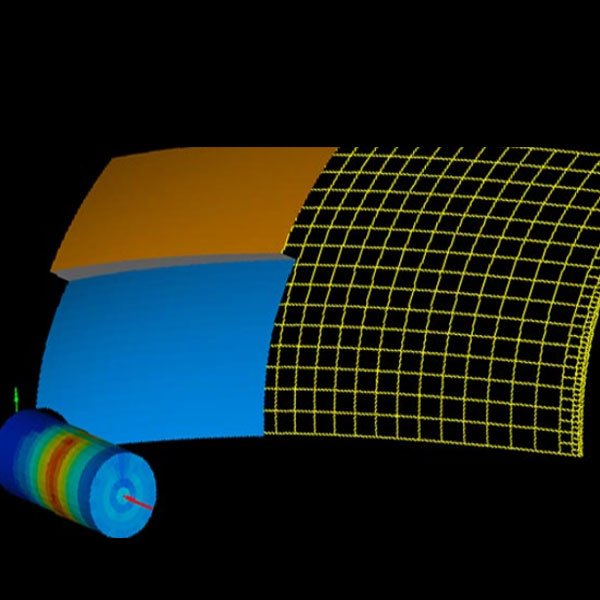
Segmented Reflector Design Tool Segmented Reflector Design Software ReflectorCAD (RefCAD) from Breault Research Organization is a paradigm-shifting reflector design tool which allows users to make graphical adjustments to the luminous intensity patterns corresponding to individual reflector segments. The program does the rest. A graphical change to the luminous intensity pattern of a reflector segment results in automatic changes to the prescription of that segment. With easy, click-and-drag construction and analysis of segmented reflectors, RefCAD greatly reduces the time required to go from creative concept, to proven design, to prototype. Use RefCAD anywhere segmented reflectors are required. The program works well as a stand-alone application or in concert with ASAP and the ELTM Module for in-depth modeling and analysis. Construction and Analysis Power features Reverse engineering RefCAD’s easy, click-and-drag construction and analysis of segmented reflectors reduces R&D time. Graphical changes to the luminous intensity pattern of a reflector segment automatically updates the prescription of that segments. RefCAD’s functionality takes a creative concept to proven design and, finally, to successful prototype. RefCAD can be used anywhere reflectors are required (1 or more segments). ADDITIONAL FEATURES IMPORT / EXPORT Import/export of system geometry in IGES format POINT & CLICK Point-and-click interface for easy graphical creation and aiming of segments SOPHISTICATED ENGINE RefCAD’s sophisticated engine results in accurate and efficient calculation of output gradients. SOURCE POINTS Assigned source points and user-defined source points. MULTIPLE OPTIONS for visualization of reflector output. SOURCE MODELS More than 200 high-quality source models included. Virtual Prototyping Techniques capabilties Choose RefCAD for its easy-to-use interface and dynamic calculations. Additional capabilities include: - Approximate reflector output in seconds to see design changes - Calculate both positional and directional output - Import sources from the BRO Light Source Library - Convert arbitrary ray-sets into source models - Export RefCAD designs to CAD packages in IGES format - Import RefCAD designs into ASAP for further analysis - Test for compliance with SAE and ECE using optimal ASAP/ELTM Module RefCAD, along with ASAP and the ELTM Module, may be used to design, analyze, simulate, and engineer a variety of automotive lighting applications through virtual prototyping techniques. refcad faq Is RefCAD difficult to use? RefCAD offers a simple workflow and drop-and-drag configurations for a friendly user experience. Is RefCAD training available? BRO offers a suite of Optics Training Courses — online, on-demand and in-person. Visit the Training tab to learn more and find a calendar of upcoming classes. Why would I use ASAP with RefCAD? For RefCAD users often incorporate ASAP when they are in need of more advanced modeling and analysis of physical optics, imagining and illumination systems. Does BRO have a full solution for engineering lighting products? Yes. ASAP, along with its Exterior Lighting Test Module (ELTM) and the application specific stand-alone program RefCAD, provide a comprehensive concurrent optical engineering environment for designing and analyzing a wide variety of incoherent and coherent automotive lighting and optical systems within a lighting design workflow. Is RefCAD expensive? BRO sells RefCAD Perpetual Licenses and an accompanying Software Support “Maintenance” Plan. Perpetual licenses are reasonably priced. Contact: sales@breault.com for more details.
CATEGORY
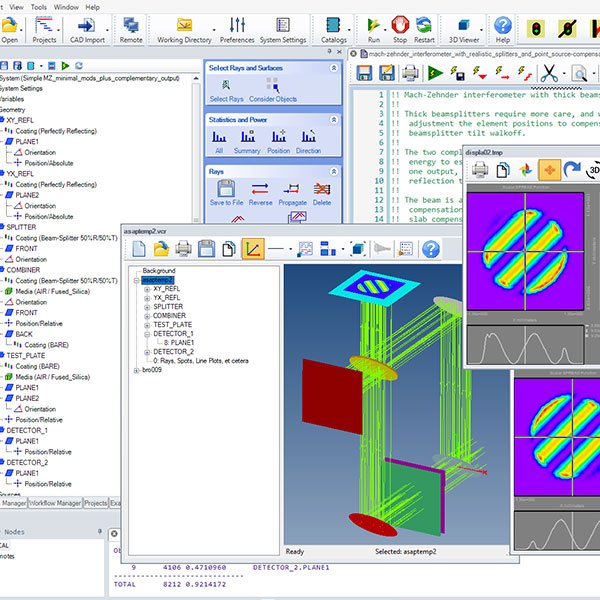
FORBES Q ASPHERE | THERMAL IRRADIANCE EXPANSION | TOWARDS DIR | MAJOR SECURITY UPDATE Unmatched Capability, Real-World Accuracy ASAP (Advanced Systems Analysis Program) optical simulation software is designed to perform high-speed, accurate simulations of optical systems – both complex and simple. It is regarded in both research and industry for tasks such as ray tracing, stray light analysis, and beam propagation. Powered by the kernel – ASAP's non-sequential raytracing engine – ASAP simulations allow for the study of even intricate phenomena like scattering, diffraction, and ghost reflections. ASAP is unmatched designing, analyzing and optimizing optical systems; it provides users the confidence to validate designs before building experimental and costly prototypes. Efficiency, Reproducibility, Customization Long regarded for its built-in scripting language, ASAP Script functions and commands are tailored for optical system modeling, which include defining optical elements, setting up ray tracing parameters, and performing analysis on simulation outputs. However, its syntax is straightforward, which makes it accessible for users of all skill levels. The appeal of Scripts is found in its efficiency, reproducibility and customization. Scripts allow users to create and save custom scripts which can be used to automate repetitive workflows. By automating simulation and analysis tasks, users can perform extensive parametric studies or optimization routines with greater efficiency. Plus, Scripts provide and maintain a clear record of simulation setups and processing steps. This is incredibly useful for reproducing results and sharing workflows with colleagues. Coupled with ASAP's powerful Optics Manager, Scripts make it easier for users to explore a wide design space or automate complex simulation sequences. Even novice users can create or modify existing scripts (ASAP comes with over 800 script examples) and tap into the full power of ASAP. Familiar Structure, Enhanced Interface FEATURES OPTICS MANAGER Optics Manager is an easy-to use interface with a familiar CAD-like tree structure. No scripting is needed. Instead, the Optics Manager allows users to: - Create optical surface and geometric entities - Define new system parameters - Import CAD geometry - Add optical properties - Add a light source - Setup ray tracing and analysis options The Optics Manager includes ASAP catalogs for Media, Coatings, Scatter Models, Sources, and Lens. The as-defined system can run with a single click. And all components, ray traces and analyses can be saved for later post processing. WORKFLOW MANAGER The Workflow Manager provides quick and easy access to command menus for assisted ASAP scripting. This feature is helpful for those users less comfortable with but still need to access the power of scripting in ASAP. Commands are found using the available search box or within the Workflow Manager tree. The Workflow Manager tree is organized around the standard 4-step simulation process in ASAP: geometry, sources, ray tracing, and analysis. Each menu is clearly labeled to show the exact information needed to construct the command. The command is then automatically inserted at the cursor location of the current active script. ASAP ADDITIONAL FEATURES OPTIMIZATION MANAGER This feature is integrated directly into the Script Editor. The Optimization Manager automatically parses INR script to find defined variables for use as Design Variables, Constraints, or Merit Functions. Optimization conditions and visual output at run-time are visible within the INR script window. MACRO MANAGER This feature automatically parses ASAP Scripts to find macro code which is presented as a list. One-click access to the list allows direct editing of each macro and changes are automatically updated to the Script Editor. PARALLEL DISTRIBUTED PROCESSING ASAP will automatically run parallel processes on all cores on a local PC as well as all cores on up to 5 Remote licenses of ASAP installed on the LAN. Plus, users can control the number of cores accessed on each machine. The combination of parallel and remote distributed processing increases ASAP's ray trace speed, power and efficiency. IMPORT POWER Import IGES and STEP files; Geometry using XML file format. Import measured manufacturer's source date in distribution file (.dis) format. Import photometric data in EULUMDAT and IES LM-63-02 formats. Import lenses from CODE V, OSLO, and ZEMAX. PERSISTENT 3D VIEWER ASAP's 3D Viewer automatically updates when any new surface, optical component or imported CAD geometry is added to the ASAP Optics Manager. Users can immediately see and verify the position and orientation of their systems. Plus, the 3D Viewer contains several features including: part transparency, optional recoloring of surfaces or components, optional changes to background colors and lighting, and easy printing or saving of the 3D view to a variety of industry standard formats. UPDATED COMMANDS A number of ASAP's Commands now have increased functionality, including: COATING TABLE Command, CPC EDGE Command, EXTREMES Command, INTERPOLATE Command, and PATHS Command. AUTOMATIC SCRIPT CREATION Once systems are constructed in the Optics Manager, ASAP automatically creates a working script from the complete system prescription. Users can immediately modify and run these scripts to add multi-variable analysis or optimization using the Optimization Manager to their design tasks. SCRIPT EDITOR The new extensible Script Editor has an improved user interface and provides more control over script syntax, appearance, and keyboard shortcuts. Plus it now has one-click access to the Optimization, Macro Managers, and $SCR Editor. $SCR EDITOR The $SCR Editor acts as a simple, two-way forms editor with one-click access to text, integer, and floating point input. Editor automatically generates corresponding ASAP script and updates to script are automatically seen in the $SCR form. CUSTOMIZED WORKSPACES Create and save your own customized workspace. EXPANDED LIGHT SOURCE LIBRARY ASAP users automatically have access to thousands of light sources for direct importation into their optical systems. OVER 800 EXAMPLES Users enjoy access to over 800 ASAP examples, complete with INR files. Flexible Toolset Applications ASAP models complex imaging and illumination systems, luminaries, light pipes, bio-optic systems, medical devices, light concentrating devices, displays, coherent systems, and more. It creates highly accurate source models using source images, point sources, ray grids, and ray fans. Users can model LEDs, incandescent, HID arc lamps, CCFLs. Users can also import from the BRO Light Source Library. Common applications include, but are not limited to: - Stray Light Analysis - Wave Optics Analysis - Gaussian Beam Decomposition - Polarization on Ray Tracing - Automotive Lighting Design - Imaging System Design - Optical System Optimization - Polarization Modeling - CIE / Chromaticity Analysis - Human Eye Simulation ASAP is a highly flexible toolset that, by its very design, can handle complex challenges. Longtime users of the program, often discover new ways of using ASAP to inform the solutions for today.
CATEGORY

BRO’s Software Support Plan, also known as “Maintenance”, is a yearly purchase that protects the license in the event of catastrophic loss. Benefits include: - Access to software updates, bug fixes, security releases - Issuance of previous installers, if needed - Technical support for installations - Rehosting assistance to prevent cloning or loss of license - Engineering support for model setup, scripting questions, etc. - Free license re-issue in the event of hardware failure, network failure, rehosting issues, corruption of license, or catastrophic loss of license - Discount on all training courses The Software Support Plan keeps the software protected, up-to-date, and supported by our internal team of Engineers.
CATEGORY
