By CytoViva
The following guide outlines the steps for installation of Time Points Image Capture using the CytoViva system and Micro-Manager. Step 1: Navigate to Micro-Manager-1.4. Step 2: Copy and paste file ‘cytovivaTime’ into the folder mmplugins. Step 3: Copy and paste these files into the folder res. - cytovivalogo.jpg - Sample Temp.raw - wavelength_data_pco.csv Step 4: Select the Micro-Manager icon on the desktop to open the Micro-Manager program. Step 5: Upon startup, you will be prompted to select a configuration file. A configuration file should be pre-selected (If not, refer to Micro-Manager manual for configuration file guide). Click ‘OK’ to proceed. Step 6: Navigate to Plugins > CytoViva Time Points to start the program. Step 7: Enter the user defined image capture options seen below. Exposure Time (msec): Shutter exposure in milliseconds. This value will be set by the user after an initial preview to test the exposure required for the sample. Bright samples will require a lower exposure while less reflective samples will require a larger exposure. Set this value to 500 (.5 seconds) to test the exposure in the following steps, then edit as required before starting the scan process. Objective: This should match the objective being used. Number of Lines: Number of lines to scan per image. Full is 696 lines, Half is 348 lines, Quick is 21 lines. If desired, you can enter any specific number of lines in the text box. For example, at 10x pixel size is 1.28 μm. 50 lines will produce an image 64 μm in height. Number of Scans: Total number of scans to be completed. Set to 1 by default. Time Between Scans (seconds): Number of seconds between image scans. Note that this is the time delay from the end of the previous image capture to the beginning of the subsequent image capture beginning. Flip Horizontal: If the image scanned is not oriented to what you see in the oculars, select this option to flip the image. Save As: Select to choose the location and file name where you want the series of scans to be saved. It is important to note that you should update the file name with each new scan (e.g. test_100x_1, test, 100x_2, etc.) to prevent overwriting files. The system will overwrite old files with new files of the same name without prompting you to approve of the overwrite. Acquire: Selected to begin the image acquisition process (after previewing and verifying the intensity). Step 8: After choosing the desired options, you should perform a live preview to verify the image is not overexposed. To do this, you first need to pull the slide bar of the dual port to the opposite position (pull out, or to the right). This redirects the image from the oculars to the spectrograph and camera for image capture. Next, select the Live button from the main menu options on the left. Once Live is selected, the preview window below will display in a new separate window. Step 9: The primary value you should observe in this preview is value located at the bottom of the preview window. This is the intensity. To ensure that the spectral data is not overexposed or clipping (data outside of the measurable range) it is recommended that the value be at least 1000 but not exceed 16,000 (which is the dynamic range of the camera). To ensure that the average data is within a measurable range. If you need to edit the exposure, close this window, edit the Exposure Time (msec), then relaunch Live preview again to review the intensity level. Step 10: Once you have the desired intensity level and are ready to begin the scan process, select Acquire. Remember, it is important to note that you should update the file name with each new scan (e.g. test_100x_1, test, 100x_2, etc.) to prevent overwriting files. The system will overwrite old files with new files of the same name without prompting you to approve of the overwrite. Step 11: Once the image capture sequence is completed, a list of available files (hyperspectral datacubes) is available. In this example, we captured five (5) hyperspectral images which are available for immediate viewing and analysis in ENVI or other compatible programs.
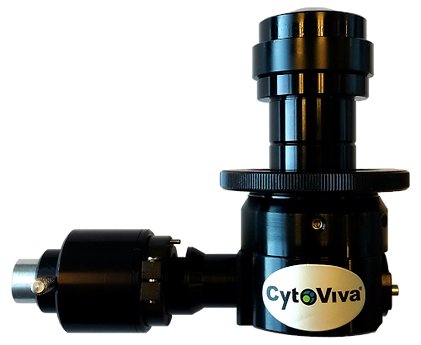
With its Enhanced Darkfield (EDF) Illuminator, CytoViva has improved on the performance and operability of darkfield microscopy to make these imaging advantages accessible to a wide range of researchers. The patented (US patents No. 7,542,203, 7,564,623) illuminator, which is compatible with most research-grade optical microscopes, is currently used by hundreds of nanotechnology laboratories around the world. Simply put, CytoViva's enhanced darkfield optics allow researchers to see things they have never been able to see before. This illumination technique enables scientists to optically observe a wide range of nanoscale materials quickly and easily in solution, live cells, tissue and materials-based matrices. In addition, non-fluorescent live cells and pathogens can be easily observed at a level of detail not possible with traditional optical imaging techniques such as phase contrast or differential interference contrast. CytoViva's Enhanced Darkfield Illuminator is specifically designed to overcome the performance and operational issues resident in standard darkfield optics. This improved performance has been accomplished by managing the source light onto the sample in a highly structured manner. The result is an improvement in the scattering signal-to-noise ratio up to ten times when compared to traditional darkfield configurations. These results have been verified in multiple independent tests (see Figures 1 and 2). With CytoViva's enhanced darkfield microscopy, nanomaterials as small as 10nm – 20nm can be imaged right from your laboratory benchtop3. CytoViva's enhanced darkfield microscope optics work by coupling the source light directly to the darkfield condenser optics via light guide. These darkfield optics include; special collimating lenses and mirrors that align and fix the geometry of the light to match the geometry of the condenser. This creates a very narrow, oblique angle of light that can be precisely focused onto the sample. The result is very intense scatter from nanoscale samples against a very dark background. This high-performance capability not only provides users with previously unobtainable images, but it also allows established techniques such as hyperspectral and Raman microscopy to be used in new and exciting ways. Source illumination compatible with this system can be halogen, mercury, xenon or even laser, depending on the application. Lastly, when combined with CytoViva's Hyperspectral Imaging capability, this high signal-to-noise microscopy method enables researchers to spectrally characterize and map nanoscale samples in a wide range of environments.
CATEGORY
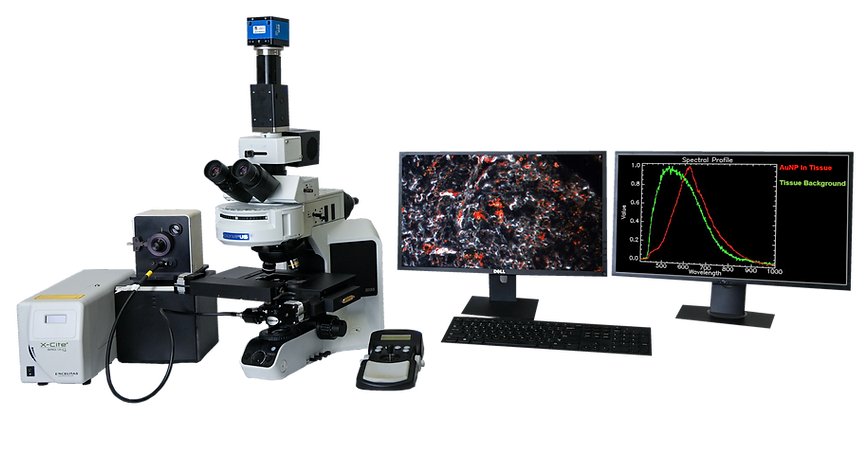
CytoViva’s Hyperspectral Microscope technology was specifically developed for spectral characterization and spectral mapping of nanoscale samples imaged with the patented CytoViva darkfield-based microscope. In addition, this hyperspectral imaging technology supports a wide range of other types of samples, from micro to macro in scale. Hyperspectral microscope images appear very similar to a traditional optical microscope image with one important difference. Each pixel of a hyperspectral image provides the complete reflectance spectral response of that pixel’s spatial area within the VNIR or SWIR spectral range. This enables nondestructive spectral measurements of nanoscale elements in the full spatial context of the sample image. At 100x magnification, a hyperspectral microscope image may contain as many as 700,000 pixels, each as small as 128nm each. This hyperspectral data is recorded at approximately 2nm of spectral resolution in the VNIR range, enabling minute spectral differences to be measured from pixel to pixel within the image. Hyperspectral microscope images can be captured of both biological and materials-based nanoscale samples. These nanoscale materials may be integrated in a wide range of biological or materials based environments. These hyperspectral images are created in a line scan or “pushbroom” fashion, by moving the sample across the field of view of the microscope and spectrograph via an automated translational microscope stage. Typically these hyperspectral images are created in seconds or minutes, depending on the required exposure. Components for the microscopy based hyperspectral imaging system include a specialized light source, automated translational stage, transmission diffraction grating spectrograph and camera. These components are integrated to work together with highly functional image capture and analysis software. This proprietary software provides the ability to compare spectra within a sample image or among large numbers of samples. It can also build a spectral library of unique samples elements and using this spectral library, these sample elements can then be mapped in subsequent samples. CytoViva hyperspectral imaging can be acquired in either the visible near-infrared (VNIR 400 nm – 1,000 nm) wavelength ranges as well as in the short wave infrared (SWIR 900 nm – 1,700 nm) wavelength ranges.
CATEGORY
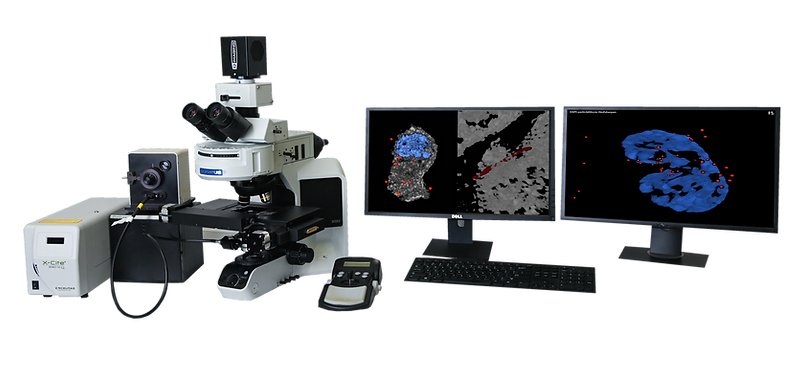
The CytoViva 3D Enhanced Darkfield Imaging System provides a method for locating non-labeled nanostructures (particles, tubes, etc.) in a variety of translucent matrices (cells, tissue, organisms). This technique leverages the high signal-to-noise optical performance of the patented CytoViva Enhanced Darkfield Microscope Technology in combination with patent-pending deconvolution and particle location routines to provide users with a three dimensional optical model of their sample. Most importantly, this technique does not require the use of fluorescent labels on the nanoparticles to obtain an image of the particles, thus removing the potentially negative influence of these labels on the sample. The 3D image is created by acquiring and storing a “stack” of equally spaced two dimensional images using the CytoViva Enhanced Darkfield Microscope Technology, a piezo-driven Z-axis stage and CytoViva’s proprietary image acquisition and control software. This stack of images is then processed using CytoViva 3D Image Analysis ImageJ plug-ins to locate the subject particles, as well as, deconvolve the surrounding cells, tissue or other translucent matrix. The resulting optical image is then viewed in an ImageJ 3D viewer. The use of ImageJ also allows further processing of the data in an environment familiar to many users. The images above illustrate three examples of the 3D capability. Figure 1 is a 3D deconvolution of nanoparticles (NPs) in a cell with the NPs in red, the nuclear structure in blue and the cell structure in gray. Figure 2 is a 3D deconvolution of a carbon nanotube piercing a tissue section. The CytoViva 3D Enhanced Darkfield Imaging System is designed to facilitate research in a variety of applications in nanobiology (targeted drug delivery and pathogen detection), nanotoxicology (nanoparticles and carbon nanotubes in tissue), and others where it is useful to understand the location of nanostructures in a three dimensional space. This capability is fully compatible with CytoViva’s Hyperspectral Imaging system and can be operated on the same microscope platform, thus allowing existing systems to be easily upgraded to include this capability.
CATEGORY
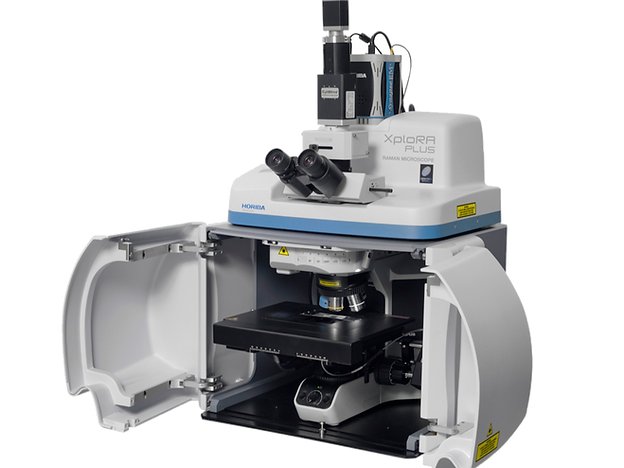
HORIBA Scientific and CytoViva have integrated confocal Raman imaging, hyperspectral imaging and enhanced darkfield imaging onto the same microscope platform. These combined modalities are very important for nanomaterial studies. Combining three different rapid imaging methods allows an easy observation, characterization and identification on the nanoscale. This integrated microscope package leverages the proven XploRA Plus Raman microscope from HORIBA Scientific. The system provides for full confocal Raman and PL imaging and the ability to select from single or multiple laser illumination options, including 532 nm, 638 nm or 785 nm. This integrated imaging spectrometer includes four gratings mounted on a motorized turret for full resolution, range and coverage (gratings are 600, 1,200, 1,800, 2,400 gr/mm). It also includes a CCD or EMCCD for enhanced sensitivity. The XploRA acquisition and analysis is conducted with the user friendly LabSpec6 software package. The KnowItAll Horiba Raman library search software is also available with this technology. When the microscope is equipped with the CytoViva Enhanced Darkfield and Hyperspectral technology and HORIBA Raman capabilities, it can capture very large area hyperspectral and darkfield images in minutes. The hyperspectral images are created with high spatial and spectral resolution, and closely resemble the sample as observed optically in the microscope eyepiece. Using the XploRA, Raman spectra of selected sample regions of interest in the identical field of view can be quickly captured. This can be done as a single shot, in a line across the field of view, or in a full Raman map. This allows for cross correlation of the Raman spectra with the broadband hyperspectral signal images, insuring accuracy of data. See the example below demonstrating the ability to cross correlate hyperspectral imaging with the Raman signal of a multi-walled carbon nanotube in stained tissue.
CATEGORY
