Acquisition and Control Software. Our slogan for RADIUS is: "Ready for the Future". In the last couple of years RADIUS evolved a lot and replaced its predecessor iTEM almost completely, due its full 64-bit compatibility, comprehensive camera and microscope control and last but not least to its seamless combination of live and offline image control and processing. A number of unique selling points with respect to image improvement like online sharpness filter, smart averaging, offline drift correction and more are also responsible for the fast and broad acceptance of RADIUS, even for long standing analySIS and iTEM users. Measurements are truly interactive and can be used both in real and reciprocal space with virtually no limitation. Fourier is now up to a new level, with up to four ROIs, discrete Fourier transformation, visualization enhancements, filters and inverse Fourier transformations. Additional features are high dynamic range images (HDRI), TEM control with the mouse. The new RADIUS 2.1 version contains a lot of major and minor improvements, bug fixes and features you may notice or which simply improves the workflow and image quality. Highlighted Features Camera Control: The camera control tool window of RADIUS provides all important camera controls conveniently on the top most level. High quality movies can be recorded by a mere click of a button. Also, smart features like snapshot drift correction are easy to access: if activated it will perfectly correct the snapshot for any drift, hence eventually providing a razor-sharp final image without a trace of drift blur left. The high-dynamic range (HDR) image feature helps to acquire images with higher dynamics, perfectly suited e.g. for diffraction images. Exposure time is calculated automatically for the final high quality snapshot, however if needed for special applications, the exposure time can be set manually on the fly. Between camera resolutions can be switched on the fly during live. The smart image averaging automatically detects for sample movement and will pause the averaging during movement in order to avoid movement smearing. Microscope Control: RADIUS provides not only the well thought concept of an easy camera control but also incorporates a convenient control of major microscope features, such as controlling the beam blanker and/or the fluorescent screen (depending on TEM). If the TEM allows to remotely controlling switching between the different imaging modes like Imaging (bright field) and Diffraction, RADIUS provides the respective controls on the top most level. In order to avoid mouse mileage and provide easiest access to major microscope controls, both the magnification and a possible goniometer tilt (depending on TEM and goniometer; including ß-tilt, if available) are controllable from here. The accessible microscope info data is easily discernible. Solution Detection (chargeable add-on): Threshold-based image evaluation of particles with the following properties: particle formation based on the detection and vectorization of particle outlines. Calculation of particle properties such as area, size, shape, position, density and intensity. Display of all data in sheets and overlay objects within the image. Visualization of connection between measurement result and measurement object in the image. Evaluation of measurement results according to ROI or class. Complete set of morphological filters for preparing particle detection. Primary methods are erosion, dilatation along with combinations and modifications of these methods. The filter matrix is user definable (rectangular as well as hexagonal). Multiple Image Alignment (MIA): MIA improved a lot, so that you are working with MIA on supported TEMs like with a standard snapshot: choose the respective matrix (from 1x1 to 5x5) and RADIUS MIA is doing the rest for more than a mere click of the MIA Snapshot button and you will receive stunning results. Automatic acquisition of mosaic/tiled images and subsequent seamless stitching is now possible with RADIUS. Most current TEMs are supported, using their image shift function as well as the goniometer/stage for low and mid-range magnifications. The stitching algorithm is much improved, resulting in up to 5x5 MIA (multiple image alignment) mosaics on the fly. Diffraction and Fourier Measurement Tools: Diffraction images ('Diffractogram') or Fourier transforms need very precise measurements, for e.g. determining the crystal structure or doing exact measurements in the high magnification/high resolution range. Here is where software must do in perfection: image document in its whole depth, RADIUS has access to the raw, the original data of the image document, to the value of every single pixel; hence detecting e.g. the very brightest pixel, finding the real center of symmetry should be a standard task by a perfect image analysis software. RADIUS performs this task perfectly, with some new, exclusive measurement tools: Once activated RADIUS determines automatically, reliable and reproducibly the center of symmetry of any image, even if the center may be covered by a TEM's beam stopper. Even more, when it is, detected, all measurements available are measured automatically towards the center, hence simplifying these sometime tedious tasks. If activated, RADIUS automatically determines the very brightest pixel in the direct surrounding of the area where the starting mouse click of the measurement has been done - reproducible, reliable, with sub-pixel accuracy. This perfect measurement helper tool does not only work on Fourier transforms and/or diffractograms, but on all other standard images. With these two powerful measurement tools the measurement on and analysis of Fourier transforms and diffractograms are now performed with great accuracy and at the same time extremely easy. Fourier analysis: RADIUS provides an easy handling of Fourier space images. As with any other image document in RADIUS there is no difference anymore between live and snapshot images, i.e. all functionality what is provided for offline images is also available for live images processing and vice versa. RADIUS fully utilizes the available Fourier command sets of modern CPUs. Up to 4 regions of interest (ROI) can be applied to one single bright field image (live or offline), dragged, resized, move etc. without virtually no limitation also during live. The resulting Fourier space image/s is/are dynamically linked with the origin: when the ROI is resized or moved the resulting Fourier image changes on-the-fly. There is virtually no limitation in size and shape: next to the basic power of two FFT, the DFT (discrete Fourier transformation) is standard since early RADIUS 1.x versions, thus allowing any rectangular shaped areas of interest. In order to provide the best perceptibility of the Fourier results, RADIUS includes a number of Fourier display enhancements, like radial enhancement, logarithmic scaling and background subtraction. A full set of convenient and smart filters are included. Detailed Function List Acquisition - "Click to Center": The specimen can be centered by a clicks to the desired position within the image. A smart algorithm decides automatically whether either stage or image shift will be used. This feature is only available on supported TEMs. Acquisition - Fast Live: The live image feature "Fast Live" is the "intX" functionality known from anaP (iTEM). Fast Live differs from intX, in such that it provides a seamless integration of short exposure time features of cameras for higher live frame rates into the general image acquisition of RADIUS. Acquisition - Identical handling of live and offline images: RADIUS provides a major improvement of the handling of images, as there is virtually no difference anymore between a live image and a offline image. All image handling and processing tools, such as interactive measurements, filters, line profiles can be applied identical with their full scope on both live images and offline images. Acquisition - Image averaging for live and snapshot: RADIUS supports the acquisition and averaging of a defined number of images in order to reduce the noise in respective images significantly. The user can define the number of images and starts the acquisition of the averaged image like a standard live image or standard snapshot. The average counts can be easily set in the top control level. The smart handling of live averaged images ("smart averaging") detects whether a specimen is moving and consecutively deactivates the averaging for the time of movement and activates it back again, once the image is stable again. Acquisition - Movie recording: Movies can be acquired with a mere click of a button in the simplified camera control. Acquisition - Online sharpness filter: RADIUS provides an automatic sharpness enhancement for live and snap of all supported EM cameras. Two different methods (NxN or Gaussian) are available for the sharpness filter. Per default NxN is applied. The user can deactivate the sharpness filter and can also edit and reset parameters. A reset to default parameters is also a mere click of a button. Acquisition - Smart image zoom: RADIUS enables the mouse wheel for simple and convenient zooming in images, both in live and offline images. Acquisition - Software clipping for EMSIS TEM cameras: TEM camera field of views can be adapted by software clipping, to e.g. avoid dark edges caused by the TEM. Acquisition - TEM camera control: The TEM camera control interface of RADIUS is much enhanced and provides ease of use. All functions which are necessary to easily acquire high quality images can be reached in close vicinity and on top level. In addition it can be switched between the different camera resolution modes and also between two cameras connected during live, "on the fly", without the necessity to stop the camera(s) in forehand. The live image document always shows the current image based on WYSIWYG, hence providing always the possibility to e.g. secure and store the current live image easily. Devices - Basic TEM control: Within RADIUS it is now possible to conveniently control basic functions of remotely connected TEMs, such as magnification, beam blanker and/or shutter on/off, goniometer tilt, viewing screen up/down. Prerequisite is, that the respective TEM remote interface supports the remote control of the aforementioned functions. Devices - Calibration of TEM camera lengths: Camera length calibrations are fully integrated within RADIUS and are handled identically to standard magnification/pixel calibrations. Devices - Support of TEMs without remote access: Older TEMs with no remote access possibilities can easily be used with RADIUS via a "virtual EM" dashboard, with e.g. predefined magnification ranges etc. Devices - TEM Alignment: RADIUS provides a number of TEM alignment procedures: - Autofocus - Astigmatism correction - Eucentric height setting - Coma free alignment - Rotational alignment Documents - Comprehensive online help: RADIUS provides and comprehensive and easy to use online user help, including a complete glossary. The online help is smartly supplemented by informative tool tips while hovering over specific buttons of interest. Documents - Image Navigator and Image Gallery: RADIUS provides an easy handling of image documents with an improved image navigator and a Windows-File Explorer like image explorer, including an easy to handle image gallery. Documents - Image properties and info stamp: Images in RADIUS can be supplied with an info stamp, providing the simple possibility to display basic meta data in the image document. General - Dark application skin: The skin of RADIUS can be switched between the standard bluish one and a dark skin, which is very helpful for darker environments normally used in EM laboratories. The skin change is applied after a restart of the software. General - Script recorder: RADIUS provides a simple script recorder in order to record and re-use standard processes within the image platform. General - User access control: RADIUS know three different user roles: Administrator, Power user, Standard user. RADIUS identifies the current Windows user as user of the software system. The user who installed the system is an RADIUS Administrator. Administrators can assign roles and capabilities to other RADIUS users. Super users can configure devices, Standard users can use the software, but cannot change settings of devices. If more than one role is assigned to a user, the user can select with which role he would like to start the system. The default role for new users is Power user. Imaging - Automatic naming and batch saving of images: Images can be named automatically according to specified image and/or acquisition parameters and saved single or as batch. Imaging - Drift correction: The drift correction of RADIUS detects drift in images during snapshot and corrects it automatically. The resulting images are sharper and are showing reduced blurring artifacts, which is cropped also accordingly. Imaging - Fourier: Additional display settings parameters: To improve visibility of high frequencies in Fourier images it is now possible to apply a radius depending gain. Intensities are amplified by a parable function (ar 2). It is also possible to automatically fit and subtract the background. Imaging - Fourier: Calibrate images: Images can be calibrated within the Fourier space. Imaging - Fourier: Complex image formats: Complex image format (32 bit floating point) for e.g. Fourier transformed images. Imaging - Fourier: Discrete Fourier transformation (DFT): RADIUS offers the DFT (discrete Fourier transform), that is, any Fourier region of interest (ROI) is can be set to virtually any arbitrary, rectangular shape, hence not anymore restricted to the FT 2 n shape. It can be easily changed between DFT and FFT by using the Shift key. Respective preferences can be set. Imaging - Fourier: Enhanced analysis and handling with multiple ROIs: An FT can be applied to both live images and snapshot with the same full functionalities. Up to 4 ROIs can be applied per image and will show 4 respective dynamically linked FT images. The FT ROIs can be easily dragged and resized and the respectively linked FT image will be updated on the fly. Line profiles can be drawn in live and snap identically. FT images will be saved as 32-bit complex TIFF images. FT images are ready calibrated, based on the origin image. Imaging - Fourier: Filters: The Fourier image, the filter and the filtered images are dynamically linked, that is, all changes in the filters are displayed in the filtered image on the fly. Moreover the filter can be applied to live images as well as to offline documents. Filters can be applied 'inclusive' or 'exclusive', can be logically combined, and are editable on the fly. Fourier transform filters are completed by the two shapes Blob and Lattice. Blob shape: Two circular blobs to be placed symmetrically with regards to the image center. Positions and blob radii are definable. Lattice shape: A mesh of circular blobs. Positioning of two blobs defines the base vectors for the mesh. Additionally, the radius is definable. As with almost any other image analysis tool, the filters can be applied both in live and snapshot, making it very convenient to apply them during a live session. Imaging - Fourier: 'Find Center of Symmetry' and 'Snap measurements' (also for Diffractograms): Diffraction images ('Diffractograms') or Fourier transforms need very precise measurements and very often measurements are referenced to their center of symmetry. Thus, simplifying these tasks and providing a most precise measurement, RADIUS now provides two new measurement tools: Find Center of Symmetry: - Once activated RADIUS determines automatically and very reliable the center of symmetry of the respective image, even if its covered in diffraction images e.g. the TEM's beam stopper. - Once the center of symmetry is defined, all measurements available measure automatically towards the center. Snap to Bright/Dark - If activated, RADIUS automatically determines the very brightest pixel in the direct surrounding of the area where the starting mouse click of the measurement has been done - reproducible, reliable, with sub-pixel accuracy. - This perfect measurement helper tool does not only work on Fourier transforms and/or diffractograms, but on all other standard images. - For completeness, on inverted (dark reflexes on bright background) images the inverse function "Snap to Dark" should be used. - The Snap functionality is available also in the respective calibration wizard for camera lengths. With these two powerful measurement tools the measurement on and analysis of Fourier transforms and diffractograms are now performed with great accuracy and at the same time extremely easy. Imaging - Fourier: Inverse Transform: An inverse Fourier transform can be applied on both, filtered and unfiltered Fourier documents. Changes performed on the source documents are dynamically reflected on the inverse Fourier image. Imaging - Fourier: Measurements: The interactive measurements are fully functional also on images in reciprocal space. Imaging - Fourier: Non-linear rainbow LUT: To ease the detectability of peaks in a Fourier image a look up table (LUT) is available. The color spectrum at high intensities is spread on a logarithmic scale. The LUT does not change the raw image data, but is used as an opaque layer. Imaging - Interactive measurements: RADIUS provides real interactive measurements, in both live and offline image documents. Measurements can be fully edited afterwards, even if the image has been reopened. Interactive measurements can be applied in both real space as well as reciprocal space. The measurement results can be exported to CSV spread sheets. Imaging - Line Profile: Averaging and Snap Rotation: The line profile is extended twofold: An averaging perpendicular to the line profile is now available; the direction and width of them are interactively definable. The line profile offers an "snap and rotation" mode, that is, it can rotated in fixed 45° steps, whilst the Shift key is pressed, and freely whilst the Shift key is not pressed. Imaging - Line Profile: Complex type images: Line profiles are fully functional on images of complex type (e.g. Fourier space). Imaging - Line Profile: Data export: The line profile data can be exported to *.csv format. Imaging - Line Profile: Position synchronized between measurement and image: When choosing a certain position within a line profile chart, this position is synchronously shown in the line profile within the image - and vice versa. Imaging - Preview for all image filters: All image filters in RADIUS have an unified user interface, with multiple options like preview with zoom, parameters changes, etc. User Interface - Pre-defined and user-defined layouts: RADIUS has various pre-defined layouts, which guarantee workflow optimized tool window and document layouts, adapted to the main applications, like image acquisition or image processing. In addition users can define and store their own layouts easily, adapted to their specific user needs.
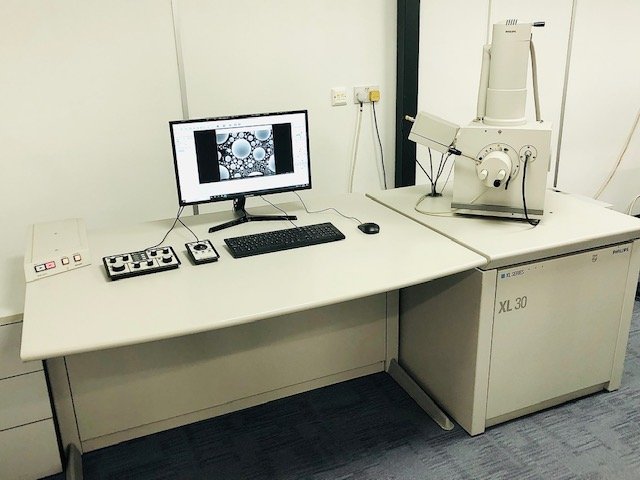
This system is both user-friendly and extremely capable, whilst the simplicity of a tungsten gun means it is also inexpensive to operate and maintain. The upgraded microscope control system by Point Electronic takes the ease of use and reliability of the XL30 and combines it with a modern PC and software to greatly extend the operating life of the instrument. Microscope specifications: Gun type: Tungsten Filament Control System: Point Electronic modernization upgrade Vacuum System: TMP Resolution: 3.5 nm at 30 kV Accelerating Voltage: 0.5 to 30 kV Specimen Stage: 4-axis motorised eucentric at all WDs Sample Chamber Dimensions: Inside chamber diameter 284mm Imaging Modes: SE OS: Windows 10 External Detectors: None, though compatible with most EDX/BS Detectors Price: Available on request Get in touch for more information, or to arrange a test drive in our showroom! SKU: 00001-3
CATEGORY
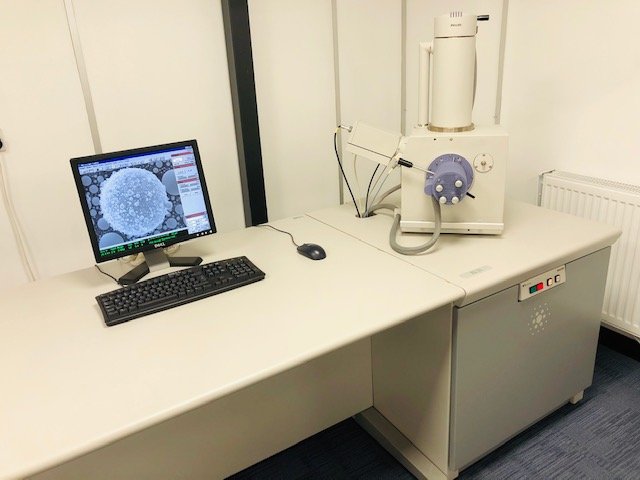
The XL30 is a user friendly, workhorse SEM, which is versatile and expandable to suit your specific requirements. It can be easily upgraded with additional accessories such as an EDX system or a backscatter detector. Microscope specifications: Gun type: Tungsten Filament Vacuum System: TMP, low vac/ESEM capable Resolution: 3.5 nm at 30 kV Accelerating Voltage: 0.5 to 30 kV Specimen Stage: 4-axis motorised eucentric at all WDs Sample Chamber Dimensions: Inside chamber diameter 284mm Imaging Modes: SE OS: Windows XP External Detectors: None, though compatible with most EDX/BS Detectors Price: Available on request
CATEGORY
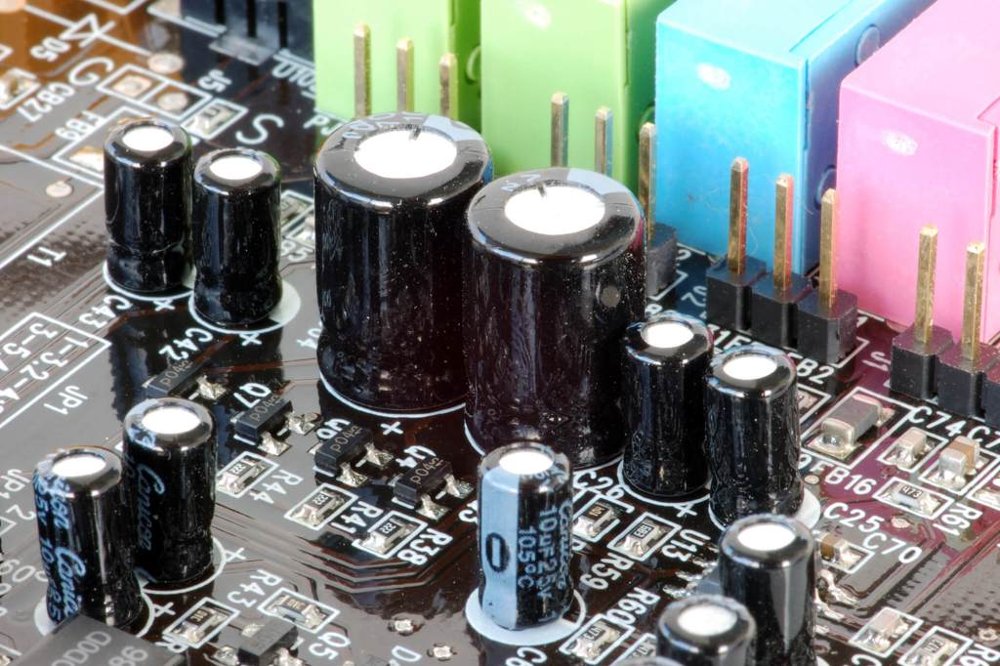
We carry a large stock of spare parts for electron microscopes, and their assorted accessories, including: - Fully refurbished gun assemblies and components - Columns (both complete and parts of), lens coils, lifting assemblies, aperture mechanisms - HT cables, insulators and anode chambers - EDX, BS, and SE detectors - Vacuum gauges, hoses, and pumps (Rough, TMP and DP) - Circuit boards for many models of TEM/SEM - And much more! To check if we have a specific item in stock, please call us on (+44) 0161 445 5442, or send us an email enquiry at services@iss-group.co.uk.
CATEGORY
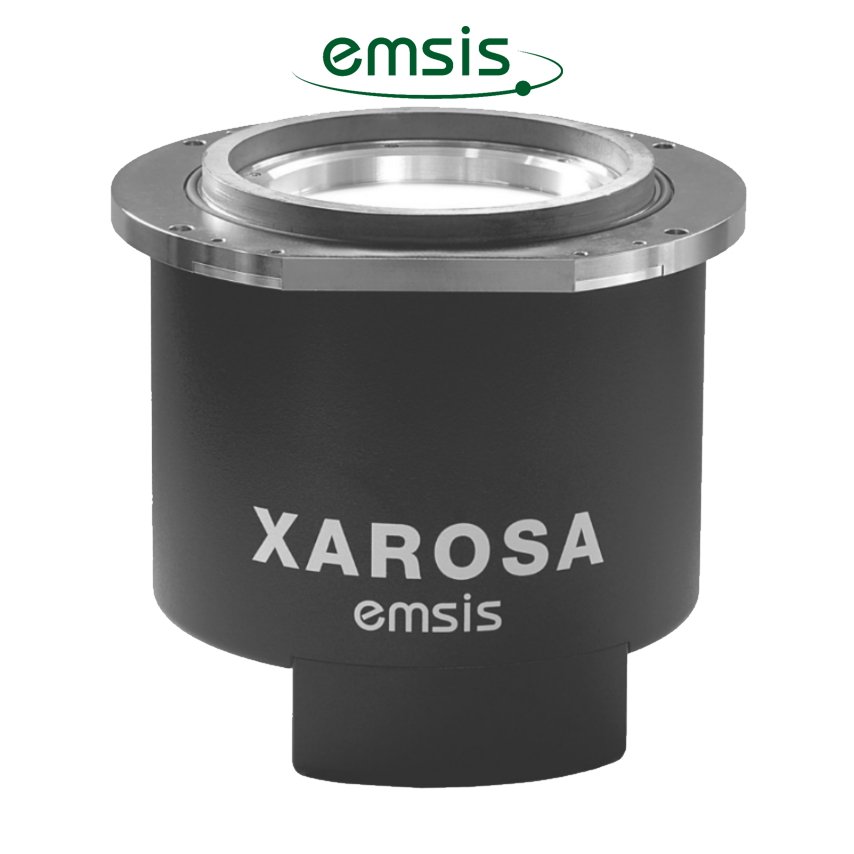
Emsis is a TEM camera and software manufacturer based in Germany. They offer a range of quality side-mounted and on-axis camera systems, with resolutions of up to 20 megapixels in order to suit your application. In addition, they supply their unique RADIUS EM imaging software which aims to maximise the potential of your current system.
CATEGORY
