2.7.8 - Fix for pause->manual move->resume with axis cant correction enabled. 2.7.7 - Added Font Size preference - Added Axis Cant Correction - CheckList shows final/corrected values for POINT items 2.7.6 - Fixed an issue with surface finding during print. 2.7.5 - Retract the dispenser to the print retraction height when pausing or finishing a print, so the tip is not left at the print surface. 2.7.4 - Factor Z offset into Resumed Print - Added "Go to safe height" option (on by default) after printing - Fixed Virtual Robot manual positioning after print. 2.7.3 - Increased droplet dispensing time to 20s. 2.7.2 - Fixed parse issue with coordinates without comma separators. 2.7.1 - Bumped version to 2.7.1 - Fixed pause/resume random offset. 2.7.0 - Ignore manual movement commands while robot is moving - Made robot position indicator larger + easier to read - Added spacing between manual position buttons - Fixed resume print offset issue. 2.6.0 - First build with Print Checklist and Print option to empty dispenser after printing. 2.5.51 - SonoCam now saves and restores per-camera settings. 2.5.50 - Updated SonoCam to remember camera dock order and displays camera serial number. 2.5.49 - Increased dispensing delay time to 7 days as an option - Added print option to resume with adjusted robot offset 2.5.48 - Added Camera ROI editing 2.5.47 - Updated optimized Pronto system defaults 2.5.46 - After printing, return to correct starting location - Fix Resume Print - Increase range of print Retraction Height - Added SONOGUIDE_FLUSH env var to enable log flushing (set to 1) 2.5.45 - Launch SonoCam automatically when SonoGuide starts - Added preference to control SonoCam auto-launch - Added Launch SonoCam button to SonoGuide toolbar - Prevent SonoCam docks from being closed - Enable SonoCam support for MacOS (Apple Silicon) - Extend Z axis range on Pronto - Auto-set Manual acceleration/velocity at startup - Fixed back coordinate for System Test - When resuming print, use last location as reference location 2.5.44 - Moved cameras into separate SonoCam app 2.5.43 - Does not require power-cycling the electronics box on systems using Animatics motors between runs 2.5.42 - Add logging for Animatics tuning commands - Notice when user changes Manual velocities/settings - Fix issue with Coordinates not storing correctly in settings/QVariant errors 2.5.41 - Add support for multiple cameras on Windows 2.5.40 - Optimized print speed by reducing communications with the motors during print 2.5.39 - Added frequency and voltage arguments to the dispense and spray remote commands - Added config file for Pronto to Windows installer 2.5.38 - Added new Pronto robot with support for IKO Animatic stages - Correctly notice changes to Coordinates if a button is pressed - Display total print duration in log when printing is complete 2.5.37 - Fixed multi-layer prints - Remote API Dispense/Spray commands now use specified duration 2.5.35 - Added robot setting for Pro to allow changing IKO stage microns-per-revolution - Added 'positions' query to API 2.5.34 - Interpret Point droplet durations from.pattern files as ms instead of seconds - Fix droplet duration override 2.5.33 - Added Pause/Resume Print - Fixed saving the settings field’s changes - Added API documentation and sample Python scripts to installation - Added number of items to the Pattern View 2.5.32 - Added ability to PAUS and RESUME a print - Print Velocity added to Print Dialog - Simplified droplet time override in Print Dialog - Fixed Dispenser feedback graph color - New Windows Installer 2.5.31 - Updated remote API - New Python wrapper for remote API - MacOS: fixed ability to reset configuration 2.5.30 - Added support for IKO stages 2.5.28 - Fixed a bug with surface cant 2.5.27 - Fixed change robot settings on Windows, which was not being visible/editable in the Robot Settings 2.5.26 - Finalized surface cant adjustment during printing 2.5.25 - Added support for new (IKO) stages 2.5.24 - Fixed polygon printing placement - Implemented original surface can’t calibration algorithm 2.5.23 - Added support for legacy dispenser firmware 2.5.22 - Support for new Z-axis motors 2.5.21 - Updated Logging for Debug - Motor command log 2.5.20 - New camera light control (#33) [Windows Only] - Support for BlackFly S BFS-U3-16S2M camera (#35) [Windows Only] 2.5.19 - Do not show diagnostics windows when using Go to Safe Height (#34) - Fixed Dispenser Calibration Graph plot color - Changed default velocities for IIb - Automatically update robot velocity/acceleration when changed in Robot Settings - Added per-parameter reset and button to grab the current position in Robot Settings - New polygon subdivision algorithm (#32) - Handle polygons with starting point the same as the ending point - Added Platen limits to Robot Settings - Removed Minimum Safe pickup height - Added support for mono cameras to MacOS - Fixed crash when manually using Spray or Dispense (#31) - Disallow robot from attempting to go to an invalid Coordinate - Automated app notarization - Increased maximum auto-save interval (#20) - When using Calibrate, prompt to continue to ensure inputs are snapshotted (#11) - Remember last-used project (#17) - Added Reference Z to Surface Calibration (#13) - Fixed Progress when homing - New substrate calibration method (#7) - Added Substrate Origin 2.3.0 - Added ability to set pattern Origin from the Pattern Viewer - Added support for new BlackFly cameras - Use native MacOS video recording - Property disable parameters when there is no loaded Pattern - Improved logging to Downloads folder - Sync Preferences immediately after editing - Added Auto-save, Auto-close preferences - API improvements - Added About Box - Improved Graph coloring - Added Solution Mix - Improved DXF Import (layer colors, bulge support, inserts) - Import settings from SonoGuide V1 - Added Import/Export options to Settings Editor - Fixed issue with Surface Finding during Printing - Allow changing Solution Plate from Solution Settings or the Solution Plate context menu - Added Video Recording to Windows build - Changed Arc subdivisions to 25 microns - Added Camera support to Windows - Allow Pattern Feature Width to be changed - Handle rinsing + swapping solutions during printing - Added System Test - Added Humidity Sensor - Fixed Solution Reload height issue during Print - Go to Safe Height after Print 2.0.0 - Redesigned to be cross platform and update the user experience
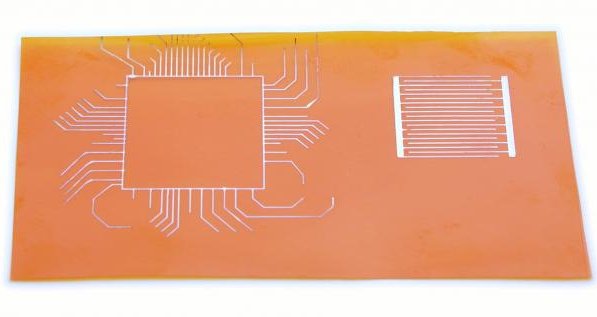
Regular wiring patterns were drawn using the SonoDraw illustration software that comes bundled with the Microplotters.
CATEGORY
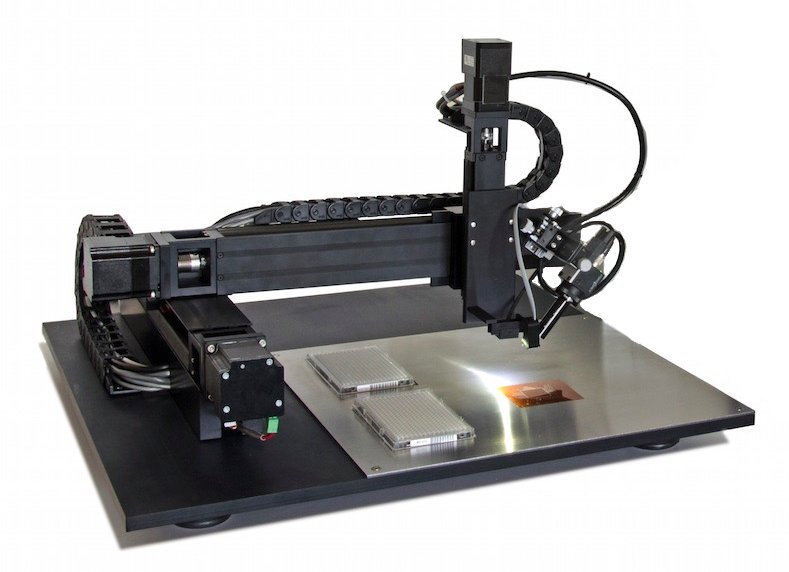
The SonoPlot® Microplotter Pro is a precision picoliter fluid dispensing system for the printed electronics markets with significant advantages over existing products in deposited feature size and type, regularity of volumes dispensed, and flexibility for the user. The core of the Microplotter is a dispenser that uses controlled ultrasonics to deposit fluid in a noncontact manner. This patented technology can produce picoliter droplets that form features on a surface as small as 5 µm wide. When combined with automatic surface height calibration, coefficients of variability for deposited feature diameters as small as 10% can be achieved. A wide range of fluids can be used, including aqueous solutions and many organic-solvent-based mixtures. Fluids that other dispensers struggle with, such as saturated solutions for MALDI-ToF matrices, or fluids with viscosities up to 450 cP, can be deposited with ease. The ultrasonic pumping action is also an efficient cleaning mechanism for quickly depositing many solutions sequentially. In addition to spots, the Microplotter Pro can draw true continuous features, such as lines, arcs, and bends. These are uniform elements, not made from overlapping droplets like other technologies, and are particularly well-suited to the polymer electronics field. Software SonoPlot's SonoGuide control software is designed to be flexible and powerful, while still being easy to use. Features of this software include: - Importing and printing of DXF and Gerber layout files - A graphical preview of patterns as they are drawn, coupled with a live video feed from the printhead - Capturing still images or recording digital video from the attached CCD camera - Controls for both completely manual and automatic movement and printing - Automatic surface tilt or curvature mapping - A human-readable text format for defining custom patterns All updates to this software are free to system owners, and we pride ourselves on responding to customer feedback by regularly adding new capabilities and improving existing ones. Technical Specifications Feature Size 5 µm - 200 µm Feature Types Droplets and contiguous lines, arcs and bends Deposition Volume 0.6 pL Deposition Variability As low as 10% Viscosity< 450 cP Positioning 35 x 30 x 7 cm (X, Y, Z axes), 5 µm resolution Calibration Automatic surface height calibration Camera USB 3.0 with digital video capture Software SonoGuide Control Software Dimensions 86.4 x 71.1 x 48.3 cm (34 x 28 x 19 in.) Weight 91 kg (200 lbs) Power 3.0 A for 100-120 V or 1.5 A for 220-220 V
CATEGORY
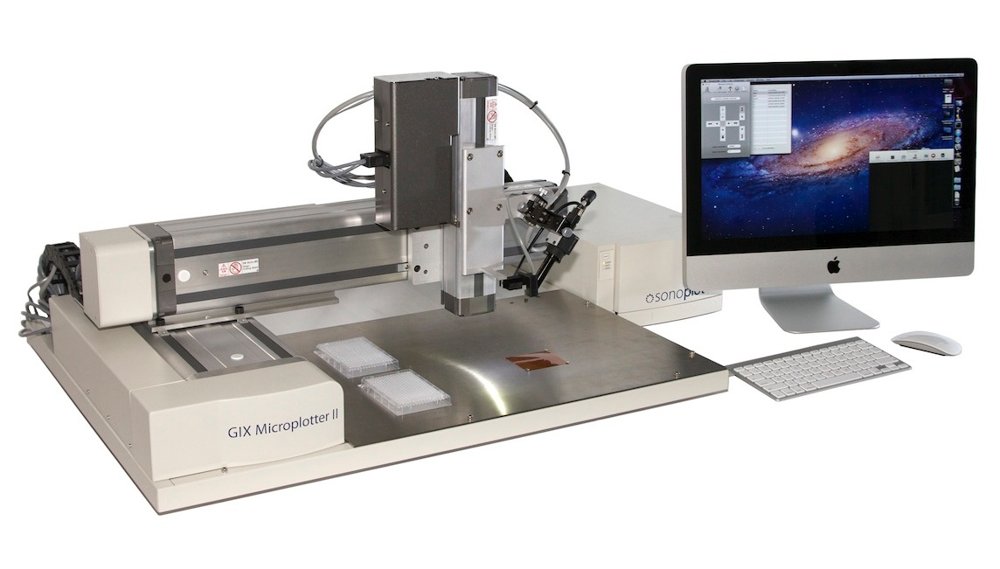
The SonoPlot® Microplotter II is a precision picoliter fluid dispensing system for the microarray and polymer electronics markets with significant advantages over existing products in deposited feature size and type, regularity of volumes dispensed, and flexibility for the user. The core of the Microplotter is a dispenser that uses controlled ultrasonics to deposit fluid in a noncontact manner. This patented technology can produce picoliter droplets that form features on a surface as small as 5 µm wide. When combined with automatic surface height calibration, coefficients of variability for deposited feature diameters as small as 10% can be achieved. A wide range of fluids can be used, including aqueous solutions and many organic-solvent-based mixtures. Fluids that other dispensers struggle with, such as saturated solutions for MALDI-ToF matrices, or fluids with viscosities up to 450 cP, can be deposited with ease. The ultrasonic pumping action is also an efficient cleaning mechanism for quickly depositing many solutions sequentially. In addition to spots, the Microplotter II can draw true continuous features, such as lines, arcs, and bends. These are uniform elements, not made from overlapping droplets like other technologies, and are particularly well-suited to the polymer electronics field. Technical Specifications Feature Size 5 µm - 200 µm Feature Types Droplets and contiguous lines, arcs and bends Deposition Volume 0.6 pL Deposition Variability As low as 10% Viscosity < 450 cP Positioning 35 x 30 x 7 cm (X, Y, Z axes), 5 µm resolution Calibration Automatic surface height calibration Camera USB 3.0 with digital video capture Software SonoGuide and SonoDraw Dimensions 86.4 x 71.1 x 48.3 cm (34 x 28 x 19 in.) Weight 91 kg (200 lbs) Power 3.0 A for 100-120 V or 1.5 A for 220-220 V
CATEGORY
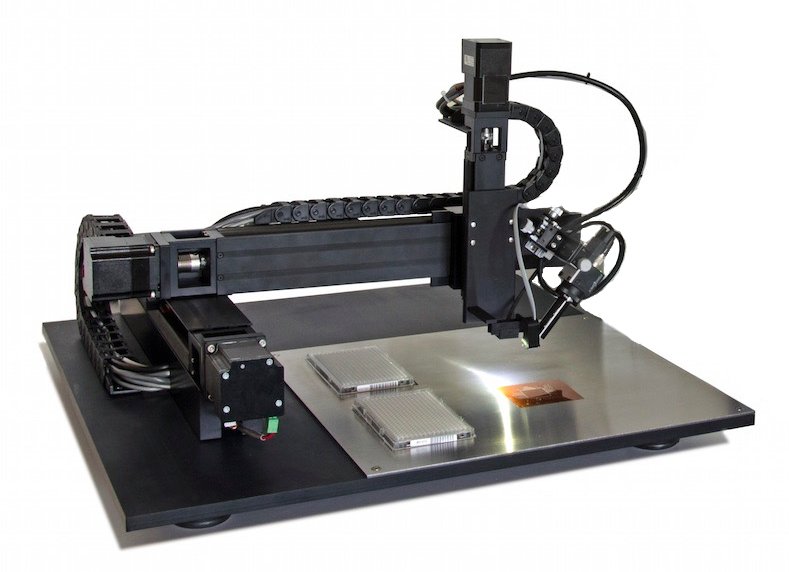
SonoPlot's SonoGuide control software is designed to be flexible and powerful, while still being easy to use. Features of this software include: Importing and printing of AutoCAD® DXF and Gerber layout files A graphical preview of patterns as they are drawn, coupled with a live video feed from the printhead Capturing still images or recording digital video from the attached CCD camera Controls for both completely manual and automatic movement and printing Automatic surface tilt or curvature mapping A human-readable text format for defining custom patterns All updates to this software are free to system owners, and we pride ourselves on responding to customer feedback by regularly adding new capabilities and improving existing ones.
CATEGORY
