By IntelliSense
Welcome to IntelliSuite: Your Complete MEMS Design and Simulation Solution At IntelliSense, we're dedicated to providing cutting-edge solutions for MEMS design and simulation. Welcome to IntelliSuite, where innovation meets precision engineering. Our IntelliSuite software revolutionizes MEMS design, offering comprehensive tools for every stage of the design process. From conceptualization to prototyping, our intuitive platform empowers engineers to create MEMS devices with unparalleled efficiency and accuracy. With IntelliSuite, you can simulate the performance of your MEMS devices with precision. Our advanced simulation capabilities allow you to analyze various parameters, such as motion, stress, and thermal behavior, ensuring optimal performance under real-world conditions. Why Choose IntelliSuite? - Comprehensive Solution: Our software offers all the tools you need for MEMS design and simulation, eliminating the need for multiple platforms. - User-Friendly Interface: IntelliSuite features an intuitive interface designed for ease of use, reducing learning curves and accelerating project timelines. - Accurate Results: Our simulation algorithms are rigorously tested and validated, ensuring accurate results that you can trust. - Dedicated Support: At IntelliSense, we're committed to your success. Our team of experts is here to provide guidance and support every step of the way. Living Design Environment IntelliSuite is a tightly integrated design environment that will link your entire MEMS organization together. Built to scale from a point tool to an organization-wide tool, IntelliSuite unifies various engineering and manufacturing tasks into a single living design environment. Designed around collaboration, IntelliSuite allows the design, process,packaging and system teams collaborate on MEMS devices that can be prototyped and manufactured with fewer costly iterations. Industry standard After close to two decades in continuous development, IntelliSuite now boasts the widest range of features available in a MEMS tool, and remains unsurpassed in its simulation capabilities, robustness and ease of use. That's why IntelliSuite serves users in more than 35 countries, including the majority of the top MEMS manufacturers, research organizations and MEMS universities. And that's why it's the industry standard software for MEMS. Seamless design flow IntelliSuite contains a wide range of closely integrated tools to seamlessly go from schematic capture and optimization to design verification and tapeout. A flexible design flow allows you to start your design at either schematic, layout or 3D level. IntelliSuite consists of a number of advanced tools that work together. For instance, Synple allows you to capture your MEMS at a schematic level, much like SPICE for electrical circuits. Your design can then be quickly iterated and optimized at different granularities. Sophisticated synthesis algorithms can automatically convert your schematic into mask layout, 3D or better yet a meshed structure for full multiphysics analysis. Blueprint, is a physical design tool that incorporates advanced layout, design rule check, cross-section exploration, and automated mask to hex mesh capabilities. CleanRoom process suite allows you to create and debug your process flow and your mask set before you enter the clean room. It allows you to make virtual prototypes to save costly fabrication mistakes. Advanced Fastfield Multiphysics tools feature fully coupled electrostatic, mechanical, fluidic, and electromagnetic engines. Advanced Model Order Reduction based Extraction techniques capture electromechanical, fluidic and damping behavior into compact models, while EDA Linker seamlessly links IntelliSuite to other leading EDA tools. Design the next small thing … IntelliSuite comes with all the design tools required to take your product from concept to market. We ship a full complement of tools with which you can perform process modeling, device layout and device analysis. In fact, IntelliSuite comes standard with completely coupled electrical, piezo-electrical, mechanical and thermal analysis tools for executing linear or non-linear static or transient analysis, while optional modules for electromagnetic, fluidic and system analysis are also available. At IntelliSense, we constantly monitor the latest developments in the MEMS industry for new features and capabilities. And if we haven't already provided everything you're looking for, we can develop customized features to meet your specific needs. Year to date, countless MEMS professionals have successfully utilized IntelliSuite to design and bring many MEMS to market. If you're a MEMS professional, IntelliSuite will give you the unlimited creative freedom to realize virtually any MEMS you can dream up. Use it to design and develop your next big or small idea! 360° overview As an engineering manager, IntelliSense provides you all the tools you need to monitor every aspect of the MEMS development. You can explore MEMS development at different granularity from high-level cost estimates and yield projections to mid-level design analysis studies, low-level process flow or metrology data. Intended for use company-wide, IntelliSuite supplies an effective mechanism to consolidate your broad organizational MEMS knowledge in one repository. Design Win With IntelliSuite, we furnish device designers like you with the comprehensive design exploration tools necessary to follow your unlimited creativity. That's why IntelliSuite includes SYNPLE and a full suite of FEM/BEM analysis tools that will allow you to design such diverse MEMS as sensors and actuators, RF and optical MEMS, and microfluidic devices and biosystems. Yield a productive crop If you are a process/manufacturing engineer, our design for manufacturing (DFM) tools grant you the capability to implement your first-time right designs. The across-the-board selection of IntelliSense process tools include virtual prototyping and 3D traveler visualization, thin film material characterization and optimization tools and databases, wet and dry-etch simulators, and Monte Carlo tools for yield prediction. So, whatever your process engineering goals maybe, our process-specific tools will help you achieve them. Systems - made simple IntelliSense enables electrical and system engineers to create and simulate complex MEMS models with exceptional ease. Thanks to SYNPLE, MEMS system design is as fundamental as dragging and dropping, and wiring the schematic. In addition, EDA Linker automatically generates high fidelity HDL (Verilog, VHDL, Simulink or SPICE) models of the MEMS and package to fit your favorite Mixed Signal simulator from Cadence, Mentor, Synopsys, Mathworks or Tanner. Wrap it up! As a packaging engineer, IntelliSense offers you tools for thermal, mechanical and high-frequency modeling of your devices. Parametric scripting capabilities allow you to effortlessly create a range of packages, such as SOICs, DIPs, QFPs etc. What's more, wafer-level encapsulation and related stress analyses may be performed with ease. As a result, you can wrap up your projects quickly and efficiently! Ace the test Working together, IntelliSuite and SYNPLE give test engineers a straightforward method for creating parametric test structures and design of experiments (DoE) during the layout process. What's more, our analysis and system simulation tools allow you to perform a vast subset of MIL-STD (750/883), JEDEC (JESD22) and Telcordia (Belcore) tests in software before the actual fabrication. For success in your next test, turn to IntelliSuite! IntelliSenses software architecture is based upon a unique combination of the best of bottom up process-driven design and top down synthesis. Top down methodology allows you to quickly explore a wide range of design options, while bottom up design provides the accuracy to produce first-time right silicon. The accurate bottom up process-driven design and top down schematic-driven synthesis are combined to get you to your designs faster and with less process iterations. From the Top, Down State-of-the-art schematic capture and simulation tools allow you to take a hierarchical approach to the design space. SYNPLE provides a large multi-domain library of electrical, mechanical, thermal, and MEMS libraries. These elements may be combined in an effortless drag-and-drop fashion and then wired to create schematics of multi-domain systems. As a result, you can quickly survey a large design space before initiating a detailed analysis and verification process. Users can perform device level optimization using Design of Experiments (DoE), Robust Design or other techniques. Mask and Hex Mesh Synthesis tools Built in place and route and synthesis algorithms can be then used to convert the schematic into a mask layout or an optimally hexahedral meshed model ready for full 3d analysis. From the Bottom, Up IntelliSuite's bottom up architecture is based upon process elements familiar process steps, such as photolithography, thin film deposition, selective etching form the basis of understanding the final device geometries. By systematically building the prototype in IntelliSuite, you can identify costly process bugs before entering the fab, which ultimately saves time and money. The process steps, combined with the mask geometries, can be used to build the final virtual device. Blueprint, an advanced layout and TapeOut all angle Physical Verification (DRC) tools allow you to layout complex masks with ease. Automated hexahedral meshing techniques can be used to construct robust meshes for analysis. Real-world connections IntelliSuite features a comprehensive material database, which allows you to understand material properties like conductivity, film stresses and mechanicall strength as a function of processing parameters. Subsequently, this enables you to produce more realistic models. Etching has always been a bugbear in MEMS technology. We've provided wet and dry etch simulators — a full anisotropic wet etch simulator for creating realistic models of your KOH, TMAH or EDP etches, and a dry etch simulator for simulating RIE/ICP and Bosch etch processes. Fastfield Multiphysics IntelliSuite comes with all the modules that you need to perform fully coupled thermal, electrostatic, fluidic and mechanical simulation and piezo simulation of the MEMS device. Optional modules for electromagnetic and fluidic/bioMEMS analysis are available. Out of the box, you can analyze almost any MEMS device that you can dream up! The IntelliSuite virtual device can be subjected to a combination of inputs, such as electrostatics, electromagnetic fields, temperature, mechanical stresses and pressures, and fluid flow. Compact Model Extraction IntelliSuite uses state-of-the-art model reduction techniques to automatically create compact system models from large finite element models. System models encompass coupled electro-mechanical behavior including stress stiffening, electrostatic softening, packaging effects, fluidic and other sources of damping. These accurate compact models can be exported to VHDL, Verilog-A, SPICE, Matlab and other tools for full MEMS-ASIC co-simulation. Open system IntelliSuite is designed to be an open system that's compatible with other tools. We speak a wide range of file formats, including DXF and GDS II (for mask import and export), IGES and PATRAN (solid model or FEA input), ABAQUS, ANSYS (FEA model import and export) and Touchstone (high-frequency analysis). Our macro-models can be used in conjunction with H-SPICE, SPECTRE, HFSS, ADMS, ELDO, Matlab/Simulink, SystemVision or other VHDL-AMS, Verilog-A or SPICE based tools for further system integration. All the analysis results and solid models can be exported to AVI or JPG format to enhance your next presentation or report. In addition, all of our file formats are rigorously documented and available, which means that, like other tools on the market, vendor lock-in is never an issue. All-in-one or À la Carte IntelliSuite was designed in a modular fashion so that you can choose the functionality that you want without overpaying. Our flexible purchasing policy allows you to buy individual modules at a later stage to add to your functionality. Perfect Pitch Export to Microsoft PowerPoint is a powerful new feature in IntelliSenses Clean Room suite of process simulation and visualization tools. IntelliSenses new layout editor BluePrint allows you to link to a process flow and look at a 2D cross-section of your mask at any orientation. These cross-sections at each process step can be exported to PowerPoint for easy documentation and sharing. FabViewer, our 3D process visualization tool, can also export a PowerPoint file with a slide for each process step. Also included at the end of the document is a helpful summary of the lithography, deposition, and etching steps. Export to Powerpoint Export process flows in cross-section or full 3D mode. Electrothermal Actuator (3D) Multi-layer beam (2D) An award-winning script... Parametric scripting IntelliSuite design tools are scriptable, enabling you to create complex designs through scripting. We have built in a language-independent scripting engine so that you can script with the language of your choice. An extensive library IntelliSuite ships with an extensive parametric library of commonly used MEMS elements, ranging from linear and rotary comb drives to release plates and springs. In addition, we have included a large library of test elements, such as stress and stress gradient indicators, Guckel rings and Euler beams for measuring the material properties of your thin films. Customize everything IntelliSuite applications can be tailor fit to your needs or whims. Everything from Menus to keyboard shortcuts and accelerators, to icons and toolbars to application layouts can be customized to fit your precise needs. If you are migrating from another tool, you can customize toolbar layouts and keyboard shortcuts so that you can apply your muscle memory without skipping a beat. Standards Based Exchange Physical Layout GDSII, DXF, CIF, GERBER, RS-247, EMK, HOLES Structural & 3D IGES, SAT, VRML, GEOM, DXF, RAW/RAWIV (Voxel) Process flow PowerPoint (PPT), PNG, JPEG, RAW, RAWIV Analysis & Mesh UNV, PAT, CDB, SAT, NEU (Ansoft, Ansys, ABAQUS, Nastran, Simulia) System & Circuit Verilog, VHDL-AMS, PSPICE, HSPICE, SIMULINK (MEX), TOUCHSTONE Result Files ASCII, CVS, PLT (Tecplot), ODB (Simulia), AVI, RAW IntelliSuite ships with a number of high quality application notes and examples to help you get started with ease. Whether you are designing a gyro or an electrophoretic channel, there is an app note that will get you off the starting block quickly.
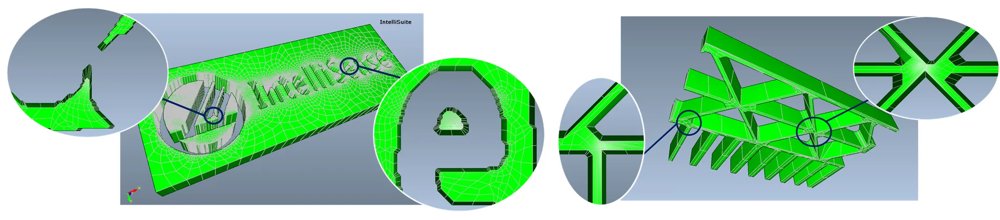
Hexpresso is a mesh synthesis tool that allows you to generate high quality all hexahedral meshes from schematics, layouts or process flows. Enjoy Hexpresso for MEMS, Microelectronics, PCB and packaging applications! Express meshing Hexpresso brings you a blend of robust meshing combined with state-of-the-art mesh algorithms to automatically produce all hexahedral meshes in a jiffy. A powerful, yet easy to use interface allows you to tailor meshes to suit your modeling needs. Wake up and smell the coffee… Design analysts spend a significant amount of time manipulating design geometries and meshing structures. Most MEMS design tools require manually partitioning 3D geometry into mesh-able regions. Studies have shown that in a typical 10-step design through analysis cycle, a staggering 73% of time is spent in geometry manipulation and meshing Design through analysis man-hours spent (not CPU hours). A typical 10-step design through analysis cycle (excluding iterations) is shown. A staggering 73% of time is spent in geometry manipulation for meshing. [Courtesy: Matt Staten, Computing and Modeling Dept, Sandia National Labs] While many tools provide automated tetrahedral(tet) meshes they are suboptimal for MEMS design. In the words of a Sandia Labs design analyst, “The only people who use tets are those who don’t care about their answers”. Hexahedral meshes are ideal for MEMS. However, automatic generation of hex meshes for complex MEMS structures has been a big challenge … until now Top features - AutoMeshing Hexpresso takes you from process flow, schematic or layout to hex mesh in one click! - Mesh Morphing morphs the mesh to make quick changes, without having to remesh - Defeature Exclude unnecessary details (dimples, for instance) and simplify polygons before meshing - Mesh Refinement Specify areas of mesh refinement. Or in case of schematic driven meshing allow Hexpresso to automatically identify areas of high stress. - Autodetect High stress regions such as springs, beam joints, plate joints are automatically identified and refined (in schematic based meshing) - Parametric Mesh Quickly vary important device parameters such as thicknesses, gaps or sidewall angles after meshing (3D Builder required) - Transform Perform mask transformations on the fly. Translate, offset, or rotate mask information. - Tightly integrated Tightly integrated within Blueprint, IntelliFAB, and SYNPLE, Hexpresso allows FEA novices and beginners to generate high quality meshes for 3D analysis
CATEGORY

The TEM Module is fully coupled with IntelliSuite’s PiezoMEMS module, the most sophisticated piezoelectric and piezoresistive modeling tool in the industry. Considering piezo actuation for your MEMS device? You can investigate the voltage dependency of the natural frequency, calculate the Q factors in different packaging environments, or apply time-varying loads with ease. You can also look at a floating conductor voltage as a function of time-varying loading, an important factor in acoustic transducer and microphone design. IntelliSuite is the only tool on the market to offer fully-coupled linear and non-linear thermal-electrostatic-electromagnetic-mechanical simulations. TEM coupled with the ElectroMagnetic module can be used to simulate static and frequency responses of magnetic or electromagnetically actuated MEMS devices. Lorentz force-driven actuators such as scanning mirrors, switches, and mechanisms can be simulated wth ease. TEM is also fully coupled with IntelliSuite’s Microfluidic module. With the capability to analyze advanced fluid-structure interaction, IntelliSuite makes it easier than ever to model complex devices like piezoelectrically-actuated micropumps, fluidic damping in large micromirror arrays, and micromechanical valves.
CATEGORY
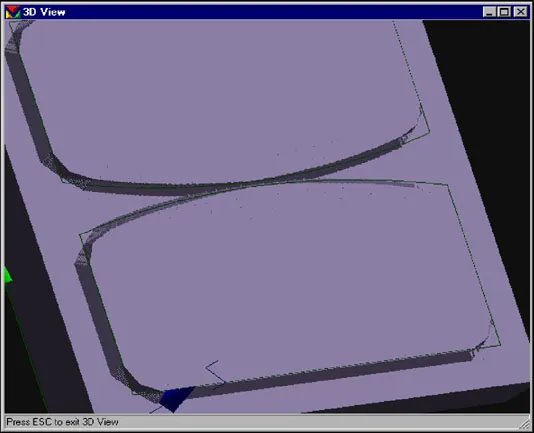
AnisE is an easy-to-use anisotropic etch process simulation tool for MEMS design and process control Demystifying etch behavior Anisotropic etching is one of the most difficult silicon micro-machining processes to model, often considered in the realm of the black arts. It can be challenging to grasp intuitively due to the complex nature of evolving etch fronts. In fact, many companies have developed closely guarded etch secrets through trial-and-error experimentation. Well, those days have ended. AnisE simplifies the process of accurately simulating etch behavior. Import your mask, choose your wafer orientation and your process parameters, and then watch the etching progress online before your eyes! Cellular automata Unlike other tools that utilize heuristic methods to calculate propagation of etch planes, AnisE is a cellular automata based simulation. What does this mean? That other tools fail to provide accurate results for complex masks and long etch times. With AnisE, you can choose any mask configuration, however complex, throw in double-sided etching and add etch stops. Its easy AnisE at work 3D evolution of Silicon etch profiles generated by AnisE are shown in three cases. (a) evolution of three different corner compensation schemes (b) double-sided etching of a silicon boss for an accelerometer application and (c) multi-etch of silicon, an example where DRIE is followed by an anisotropic etch. Sophisticated controls AnisE comes with built-in etch databases for KOH and TMAH. It automatically updates the etch rates as a function of temperature and concentration. With AnisE, you can simulate single or double-sided <100 and <110 etching. You can incorporate multiple etch stops, steps or anything else you can do in the real world. In addition, you can study the effect of mask misalignment, the effect of combining RIE etching with anisotropic etching and many other real- world conditions. Whether you are interested in studying process variation or designing corner compensation features, AnisE will become an invaluable part of your process toolset. Comprehensive Capabilities AnisE is capable of predicting the effects of etchant temperature, concentration, and etch time on the final 3D device geometry. Corner compensation and process tolerances can be modeled and visualized with AnisE. Creating correct geometries based on proper etch parameters before entering a fabrication facility saves resources otherwise spent on multiple prototype iterations. Top features By creating or importing a mask file, users can: - Simulate <100 or <110 wafer orientation etching - Simulate etching under different time, temperature, and concentration parameters - Access TMAH and KOH etch-rate databases, or use customized etch-rate data - Etch the top, bottom, or both sides of a wafer - Implement multiple protective etch stops - Perform multiple etchings with different masks on a single wafer - Study the effects of misalignments and other process deviations - Determine the effects of vertical etching coupled with anisotropic etching - Perform 3D geometric visualization and cross-sectioning - Take distance measurements on the etched wafer - Visualize and export 3D results in DXF and VRML formats
CATEGORY
IntelliFAB allows you to debug your process flow and your mask set even before you enter the clean room. It allows you to make virtual prototypes to save costly fabrication mistakes. Welcome to your virtual fab Until now, MEMS designers have typically focused purely on geometric representation of the device in order to analyze device behavior. The drawback of this methodology is that process induced effects may vary the geometry of the structure significantly. For example, the boron diffusion as an etching stop layer for bulk silicon processing may overstress the structure, strain gradients in poly-silicon structures can distort features, or an anodic bonding process may break down protective oxide films. IntelliFAB allows designers to takes a different approach. Process flow forms the basis of creating your devices. Our comprehensive process simulation modules incorporate deposition, etching, bonding, doping, electroplating, liftoff, and other process steps common in MEMS design. Other process-induced effects, such as micro-assembly, are also addressed to generate accurate geometric models for the complete range of MEMS devices. IntelliFAB is directly linked with MEMaterial, a MEMS process database that stores material properties as a function of your machine settings. By developing the fabrication process in conjunction with the analysis model, IntelliSuite enables engineers to perform more accurate device physics analysis and produce manufacturable devices faster. MEMS Process Editor A typical MEMS process flow can consist of hundreds of process steps which need to be cataloged and debugged; IntelliFAB makes editing and organizing large process tables easy. Built in grouping, filtering, and arrangement tools allow you to section, organize and debug large process tables. IntelliFAB allows you to quickly build and debug your process traveler down to the last detail. Foundry ready templates Processes can be custom-designed one step at a time, or engineers can draw from a wide range of foundry-ready process templates. Users create their own process flows from a database of over 70 process steps or by including custom process steps. Process flows can be saved as templates for repeated use. Support for popular processes MUMPS, SUMMiT-V, Infotonics (SOI Hybrid), AMIMOSIS, Bosch Surface Micromachining, LIGA, Cornell SCREAM is included out of the box Take the pain out of meshing Hexpresso, our mesh synthesis tool is now integrated with IntelliFAB. With click of a button you can create high fidelity, all-hexahedral meshes from the process flow. MEMS Designers can spend up to 70% of their design person-hours creating and manipulating meshes. Solid models created by IntelliFAB can be directly exported to analysis engines with the click of a button, saving you considerable effort and time. IntelliFAB uses true process information along with your mask layouts to create the device model for analysis. Movies Dynamic Cross Sections: View FABViewer Cross-sectioning capability in real-time. Visualize Complex Processes: Virtual prototyping of a mechanism using the Summit-V process Process Debug In Action: See how FABViewer can help you in process debug Slides View Slideshow: IntelliFAB Slideshow(Slideshare) Download PDFs: IntelliFAB Presentation PDF Wrap it up! As a packaging engineer, IntelliSense offers you tools for thermal, mechanical and high-frequency modeling of your devices. Parametric scripting capabilities allow you to effortlessly create a range of packages, such as SOICs, DIPs, QFPs etc. What's more, wafer-level encapsulation and related stress analyses may be performed with ease. As a result, you can wrap up your projects quickly and efficiently! Ace the test Working together, IntelliSuite and SYNPLE give test engineers a straightforward method for creating parametric test structures and design of experiments (DoE) during the layout process. What's more, our analysis and system simulation tools allow you to perform a vast subset of MIL-STD (750/883), JEDEC (JESD22) and Telcordia (Belcore) tests in software before the actual fabrication. For success in your next test, turn to IntelliSuite!
CATEGORY
