By JC Nabity Lithography Systems
Software to communicate with a Keithley 6485 Picoammeter through a serial port is available with NPGS at no charge. Current users can send e-mail to get a copy of the new software at no charge. The current release of NPGS also includes a feature to allow the user to call the new software so that multiple readings from the picoammeter can be averaged and automatically entered into the NPGS software before a pattern is written.
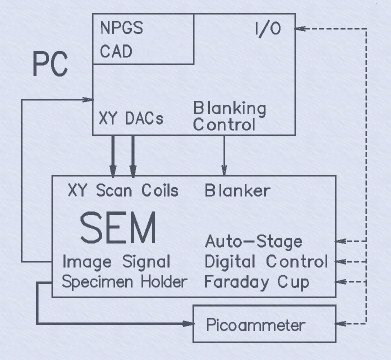
System Description: Software: NPGS - Version 9.2 (site-license included; see "Upgrade History" for a listing of the most advanced features.) QCAD Professional v3.32 (site-license included; unlimited use for educational institutions). 64 bit Windows 11 Pro (when PC is included). Hardware: 16-bit High speed PCIe516 lithography board. Cables to connect NPGS to microscope. Optional relay adapter to share microscope input with another accessory, typically an EDX system. Workstation PC with (or better): 8 GB RAM, 500 Gb Hard Disk, DVDRW Drive. 24" LCD Monitor. LAN, USB, Serial Port. NPGS Installation Guide: Detailed installation instructions for nearly every microscope. How to calibrate absolute pattern size and aspect ratio. Checklist for testing and characterizing the microscope. Interface instructions for serial or Ethernet microscope interface, as appropriate. NPGS User's Manual including: Detailed instructions for NPGS software. Detailed tutorial on how to set up and run a Scanning Electron Microscope for writing nanometer patterns. Sample patterns and run parameters. Solutions to Problems section covering nearly all common microscope and/or lithography problems. NPGS Training: Optional on-site user training. The user must supply: SEM, STEM, FIB, HIM (Helium Ion Microscope), or dual SEM/FIB with: XY External Scan Control Input (within +/- 3 to +/- 10 volts, 2k ohms). Image Signal Output (within +/- 10 volts). Picoammeter for Measuring Beam Current (0.1 pA resolution or better; typically Keithley 6485). A dual SEM/FIB can have both beams controlled by NPGS, but only one at a time where either a software or hardware switch (depending on microscope model) will select the writing mode. Recommended: Beam Blanker with rise/fall times <1 usec (digital input within +/- 5 v and <200 mA). (Slow Beam Shutter or no blanker will also work). Fine Z stage control to ~1um. Faraday Cup (apertures to make cup are included with NPGS). Scan Rotation Option. Gold on Carbon SEM standard mounted on sample holder. Stray AC less than 3x10⁻⁷ Tesla(p-p); Magnetic shielding for chamber or active field cancelling system can reduce interference. Vibration less than 2x10⁻⁶ meters(p-p) over 5 Hz. Other Configurations: (NPGS Software is Identical to Full System) The user may supply any of the following: Workstation PC. Installation. Minimum computer requirements for NPGS v9 and higher: 2 GHz CPU recommended. Windows XP (32 or 64 bit Win7/10/11 Pro recommended). 256 MB RAM (4 GB or more recommended). CD ROM. 1 available PCIe Slot (for full length board, 12.3" = 31.2 cm). 1280x1024 Graphics. Serial Ports and/or Ethernet interface may be required for optional control of a stage and/or SEM. NPGS Updates: NPGS software updates are available at no charge to current NPGS users.
CATEGORY
Software: - NPGS - Version 9.2 (site-license included) - QCAD Professional v3.32 (site-license included; unlimited use for educational institutions). - 64 bit Windows 11 Pro (when PC is included). Hardware: - 16-bit High speed PCIe516 lithography board. - Cables to connect NPGS to microscope. - Optional relay adapter to share microscope input with another accessory, typically an EDX system. - Workstation PC with (or better): - 8 GB RAM, 500 Gb Hard Disk, DVDRW Drive. - 24" LCD Monitor. - LAN, USB, Serial Port. NPGS Installation Guide: - Detailed installation instructions for nearly every microscope. - How to calibrate absolute pattern size and aspect ratio. - Checklist for testing and characterizing the microscope. - Interface instructions for serial or Ethernet microscope interface, as appropriate. NPGS User's Manual including: - Detailed instructions for NPGS software. - Detailed tutorial on how to set up and run a Scanning Electron Microscope for writing nanometer patterns. - Sample patterns and run parameters. - Solutions to Problems section covering nearly all common microscope and/or lithography problems.
CATEGORY
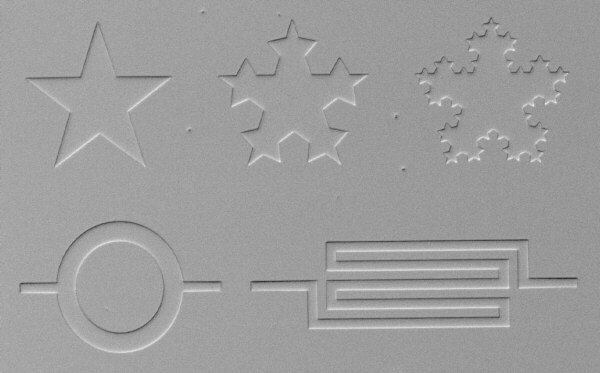
This image shows the powerful capability of the NPGS "Filled Polygon" feature. Each of these structures was created in the DesignCAD program as a single polygon, and they are automatically filled by NPGS during the pattern writing. The patterns were written in 950k PMMA and are shown after development and Au sputtering, but with no liftoff. The scale on this image is indicated by the serpentine structure which has a linewidth of 1 micron. The two stars on the right were created using a "fractal" program that runs within DesignCAD. These "fractal" stars show both the complexity allowed in a filled polygon (any shape with up to 1000 vertices in NPGS v9) and the power of the programming environment within DesignCAD. The circular structure is a polygon with 122 vertices which are so close together that the short straight lines defining the inner and outer circles are not observable. (This image was acquired with the NPGS Digital Imaging Feature.)
CATEGORY
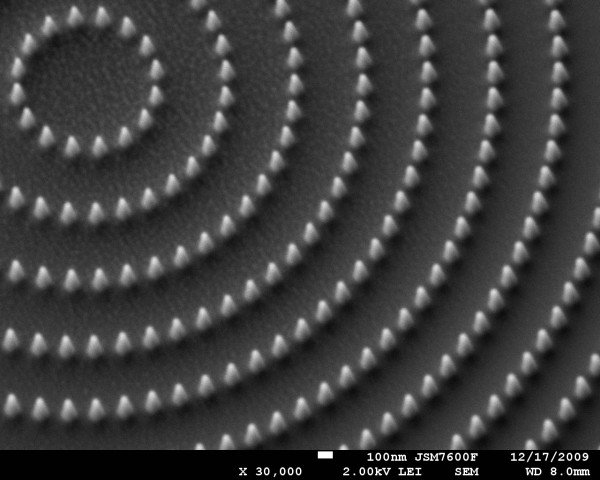
This is an SEM image of platinum features deposited directly onto a substrate using Electron Beam Induced Deposition (EBID). The features were written using NPGS with a thermal FE SEM with an OmniGIS Gas Injection System attached. The precursor used to deposit these platinum (Pt) features was MeCpPtMe3 [Trimethyl(methylcyclopentadienyl)platinum(IV)]. These features were written at 30 kV with 1 nA of beam current. The writing time for the features in the image was approximately 2 minutes. Note how the base of the features are ~100 nm in diameter, while the tips are much smaller. NPGS can also be used with ion beam microscopes which have a gas injection system to perform ion beam induced deposition.
CATEGORY
